Google just released the third iteration of Android 13 beta 3, which has bought quite a bit of bug fixes and improvements along with new features in the system.
With the release of the third beta, Beta 3.2 majorly focused on introducing some new features lock screen, more gestures and overlays, etc. in that patch and fixed some application and microphone issues. Beta 1 was released in April 2022 and Beta 2 was released in May 2022 which introduced us to some new features and changes. Beta 3.3 is the third patch of Beta 3 which includes some minor tweaks and performance changes and also stabilizes the system with bug fixes.
Android 13 Release date: September - October 2022
Beta 3.3 fixed issues with Bluetooth Manager Service and Connectivity Thermal Power Manager which were earlier leading to unresponsiveness of apps, poor UI performance and battery issues. Network fluency has been improved and fixed an issue where a device couldn't connect to a Wi-Fi even after signal strength was good. More changes have also been reported by Google. Check out the full changelog below!
While we are not sure if Google releases another patch for the third beta, it is sure that Google is regularly bringing out patch fixes and updates to enter the Beta 4 stage and soon release Android 13 globally. Let's go through some of the changes and fixes that were made in the Beta 3.3 patch.
Android 13 Beta 3.3 Changes and Bug Fixes
The build number has been updated to: TPB3.220617.002
Fixed an issue with the Pixel launcher where if the Always show Keyboard option was enabled for the app drawer, then when the user closed the app drawer and opened an app folder on the Home screen, the keyboard was erroneously shown as well.
Fixed an issue where in some cases, such as gesturing to go back, the system UI crashed.
Fixed an issue where devices couldn't connect to a WiFi network even when the network was available and the signal strength was good.
Fixed an issue with BluetoothManagerService that led to slow performance and cold starts for apps.
Fixed an issue where in some cases after a device was plugged in to charge (for example, overnight), the device would become unresponsive until it was rebooted.
Fixed a kernel issue with lib/list_debug.c that caused a kernel panic for some devices.
Fixed an issue with the Connectivity Thermal Power Manager that caused slow UI rendering, unresponsiveness in apps, and poor battery performance in some cases.
How to get the Android 13 Beta 3.3 patch?
You'll instantly get an over-the-air (OTA) update to Beta 3.3 if you're already signed up for the Android 13 beta.
Visit g.co/androidbeta if you haven't already and would like to sign up for Android beta.
Please take note that the OTA update on your smartphone could take up to 24 hours to arrive. Go to Settings > System > System updates to check for updates.
After the announcement of Android 13 at the Google I/O conference and the release of the previous beta updates of Android 13, Google has launched another Beta 3.2 update release for its Pixel devices. The first Beta program was launched in April 2022. It was the initial beta release which was launched only for the selected users who enrolled on the beta program.
Well this time, Beta 3.2 came with some visual tweaks and minor changes that we're going to talk about in this article. The previous updates continued compatibility testing as well as monitoring feedback from Android Beta users. It also majorly focused on starting early testing with Android 13 and reporting any concerns to the SDK and library developers.
From Lockscreen and Homescreen to all the bug fixes, Android 13 Beta 3.2 brings out some minor changes and bug fixes. Let's dive deep into it.
New Features of Android 13 Beta 3.2
Build Number: The build number for the latest update has been updated to: TPB3.220610.004. You can check if your latest version has the following build number. Else, wait for the update to be rolled out completely.
Lockscreen: Minor lock screen changes can be seen such as the vibrate icon on the lock screen which was only available when you unlock your device but now it is visible on the lock screen. In the latest build, the App icon can also be seen next to the artist while a song is playing on your device which wasn't the case in the previous build.
Homescreen:
One of the changes on the homescreen is the new search widget lens. The minor colour change can be seen in the search widget and the system-wide search and the same goes with the chrome search bar.
For the system-wide search, now you have the option available in the Home Settings to switch on the "Always Show Keyboard" option which would open the keyboard every time you swipe up your phone on the home screen.
Gestures & Overlays:
In the predictive back gesture, as we swipe left from the middle corner while using an application will now show the homescreen in the background rather than a black screen which was an issue occurring in the previous build which has now been fixed.
Google also removed a gesture where we could start a new split-screen by tapping and holding on to the notifications. This gesture was available in the previous build but it has now been removed.
The clipboard overlaying menu no longer shows the edit button but a share button and if you want to edit the text, you simply want to click on it.
Battery: Under the Battery section, a new notification can be seen on the top of the battery settings with the name "Higher Battery Usage" showing all the applications consuming the battery the most. Under the Security settings, the Google Play System update is now running on July 1st 2022. In the previous build, it was running on June 1st 2022.
New Fixes:
Fix no.1 solved the back gesture issue in the Beta 3.2 update. In the Beta 3.1 update, the Back Gesture suddenly stopped working which was kind of annoying but gladly, it has now been resolved.
A blank white page with just the hangup button would be visible for 5 seconds after hanging up a phone call but the issue has now been fixed.
A picture-in-picture issue with Google Maps has now been resolved. The Assistant Driving Bar would not show up as you go back to the home screen but in all the previous updates, it stayed on for a few seconds before it got vanished.
There are a few more minor fixes and changes in some areas. You can check those changes in the official changelog further below.
Bugs in Beta 3.2: In the Schedules section under Do Not Disturb settings, when we click on the Gaming mode, it would suddenly stop working or sometimes shows a pop-up saying Settings keeps stopping. Another bug is the Gaming dashboard which wouldn't show up when we start playing a game.
Official Changelog
Fixed an issue where the back gesture wasn't working in some apps.
Fixed an issue where the At a Glance setting would collapse inconsistently when scrolling.
Fixed an issue where some apps would crash instantly when opening.
Fixed an issue where the microphone would turn on & off unexpectedly during unrelated use of the device.
Fixed an issue where the Google Photos app would crash frequently.
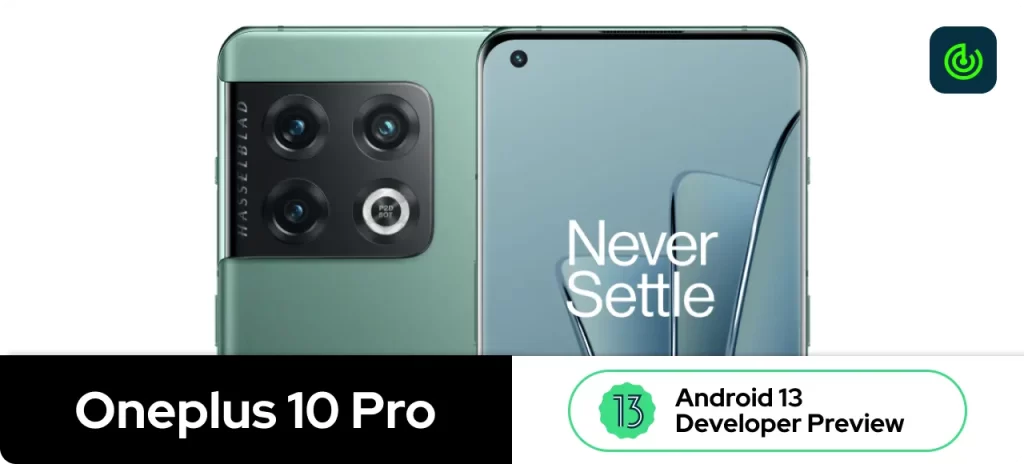
A new build of Android 13 Beta for the OnePlus 10 Pro is now available as part of the Developer Preview Program, according to OnePlus' community post. As part of our efforts to provide all OnePlus 10 Pro users with early access to the latest Android version, which brings a ton of improvements to previous build.
Highlight [New Build]: This new update brings the May 2022 Security Patch, which brings a lot of new fixes to the system and camera as well.
Release Date: June 16th 2022, Limited users directed toward Testers/Developers
Before proceeding, check out the first developer preview of Android 13 for Oneplus 10 Pro, as this update is a follow-up and required the first build to be installed: Oneplus 10 Pro: Android 13 Developer Preview
OnePlus 10 Pro was released on 13th January 2022 with Android 12 out-of-the-box.
Developers and other advanced users should use this build of Android 13. In order to create even better software experiences, it is important to provide early adopters with access to Android 13 at an early stage. It is expected that the software will contain bugs since it is still under testing.
[Fixed] the issue of crash when turning off/on 5G network
[Fixed] the issue that unable to close all background programs
[Fixed] the issue that the lock screen password was required to enter the launcher after restoring factory settings
[Updated] Android security patch to 2022.05
Camera
[Optimized] the overall shooting effect of the camera, improved the user experience
Caution:
You should understand there is a risk of BRICKING your phone, read the instructions carefully and be 100% sure of what you are doing. Please always backup your important data before flashing.
Please note:
These instructions are only for the OnePlus 10 Pro. Please make sure the battery level is above 30% and a minimum of 4GB of storage space is available.
Carrier version devices (TMO/VZW) aren't compatible with the Developer Preview builds.
MP version – Stable official version DP version – Developer Preview version OBT Version – Open Beta version
How to install the Android 13 Developer Preview Update in your Oneplus 10 Pro:
Download the latest ROM upgrade zip package from the specified server.
Copy the ROM upgrade package to the phone storage.
Go to Settings -> About device -> Version -> Click Build number 7 times and enter the password, now you are in the developer mode.
Go back Settings -> About device -> Up to date -> Click the top right button -> Local install -> Click on the corresponding installation package -> Extract -> Upgrade -> System upgrade completed to 100%.
Download the latest ROM rollback zip package from the specified server.
Copy the ROM rollback package to the phone storage.
Go to Settings -> About device -> Version -> Click Build number 7 times and enter the password, now you are in the developer mode.
Go back Settings -> About device -> Up to date -> Click the top right button -> Local install -> Click on the corresponding rollback package -> Extract -> Upgrade -> System upgrade completed to 100%.
Developers will be able to test their apps with an upcoming Android version early with this early Android 13 build. Its main purpose is not to collect bugs. You can use the built-in feedback tool of Google to provide feedback on any bugs you encounter with this build.
With the announcement of Android 13 by Google at I/O in February 2022, Google has launched several Beta programs. The first Beta program was launched in April 2022. It was the initial beta-quality release launched only for selected users who enrolled.
While the second beta program was launched last month in May to Continue compatibility testing and to watch the feedback from Android Beta users. Start early testing by targeting Android 13 and Notify SDK and library developers of any issues.
A few days back, the third Beta update is rolling out to test the android 13 which Start final compatibility testing for apps, SDKs, and libraries. Release compatible versions. Continue work to target Android 13. Update SDKs and libraries and notify their developers of any issues.
We collected the list of new features that will add to the Beta 3 version of the Android 13. As you are familiar that this Google has already launched two Beta programs and this is the third beta program for android 13, these features are for testing purposes only and the actual features may vary in the stable update.
New features of Android 13 Beta 3
We know quite a bit already about this OS update. We'll keep this page updated as other details emerge closer to its release, but here are some of the rumours regarding the bigger changes:
Material You updates. Android 13 will likely build on Material You, Android 12's UI revamp, which allowed a range of customizations like matching your wallpaper colours to your app themes.
Enhanced privacy controls. The OS will also build on Android 12's privacy features, including the option to allow the app access to specific photos rather than all of them, a clipboard auto-clear feature that deletes the contents from the global clipboard after a set amount of time (60 minutes, by default), and a 7-day look at the privacy dashboard instead of only 24 hours.
Improved QR scanning. This OS update could allow users to scan QR codes from the lock screen. There could also be enhanced shortcuts to the QR reader.
Continuous playback. It could introduce a Tap to Transfer features, like Apple offers between its iPhones and HomePods. It lets you continue playing your music from your iPhone to your HomePod and back again.
Split-screen from notifications. Drag a notification to one side of the screen to quickly open that app in split-screen mode. Just long-press the notification and decide where on the screen it should go.
More notification control. This feature would force the app maker to ask permission to send notifications, similar to the prompt you get on many browsers.
Per-app language settings. Users might be able to set a different language default depending on the app, rather than one global default setting.
A better flashlight. Rumours say that Android 13 will allow users to adjust the brightness of the flashlight, though this may only work in new devices that have the hardware to support it.
Faster pairing. Fast Pair will let you quickly pair a device with your phone so you don't have to manually walk through the settings app to do it. The speculation is that you'll be alerted about the device when Android identifies something is wanting to pair with it.
Bedtime dark mode. With this option, you'll be able to trigger dark mode automatically at bedtime.
Easier guest app installs. You'll be able to choose which apps to install to the guest profile when you make a new guest user in Android 13.
Follow typing with a magnifier. In the accessibility settings, a new toggle will be available that makes the area you're magnifying automatically follow the text as you type.
Greater lock screen access. Through a setting called Control from the locked device, Android 13 will remove the requirement to unlock your phone to access smart home controls.
Foreground Services (FGS) Task Manager. This new feature shows the list of apps that are running a foreground service and provides a stop button to instantly end any of them. You'll receive a notification to stop a task if Android detects that it's been running for at least 20 hours within a 24-hour window.
Infinix Mobile is a Hong Kong-based smartphone company founded in 2013. The Infinix Android smartphones are a hit with its users due to the availability of the specifications in their budget range. Infinix has launched many smartphones with Android 11, and Android 10.
While other manufacturers have begun developing Android 13, Infinix is struggling to release the Android 12 update to eligible devices. Infinix does not have a good reputation for software updates. The fact that Infinix has not updated a single device to Android 12 is horribly disappointing. Even the company did not provide a list of eligible devices. The Android 12 update is expected to arrive in August on the Infinix Zero 5G.
Android 13 is the upcoming major release of the Android mobile operating system. Android 13 Beta 2 was officially announced in an Android blog posted on May 13, 2022. Here is the list of partner devices which gets Android 13 Beta.
Some of the major OEMs have started rolling out the Android 13 Beta Developer Preview update. Some of the flagship devices are from Google, Samsung, ASUS, Lenovo, Nokia, OnePlus, OPPO, Realme, Sharp, TECNO, Vivo, Xiaomi, and ZTE. Google Pixel devices will be receiving 2-3 more Beta updates in the coming months.
XOS: Infinix’s Mobile Operating System
XOS is an Android-based operating system developed by Hong Kong mobile phone manufacturer Infinix Mobile exclusively for their smartphones. XOS allows for a wide range of user customization without requiring rooting the mobile device.
The first release for this was introduced as XUI in 2015 and later as XOS in 2016. The latest release for XOS is the XOS 106 which is based on Android 12.
The operating system comes with utility applications that allow users to protect their privacy, improve speed, and enhance experience among others. XOS comes with features like; XTheme, XClone, Kids mode, Split Screen and XManager, Peek proof, Theft alert, and XHide.
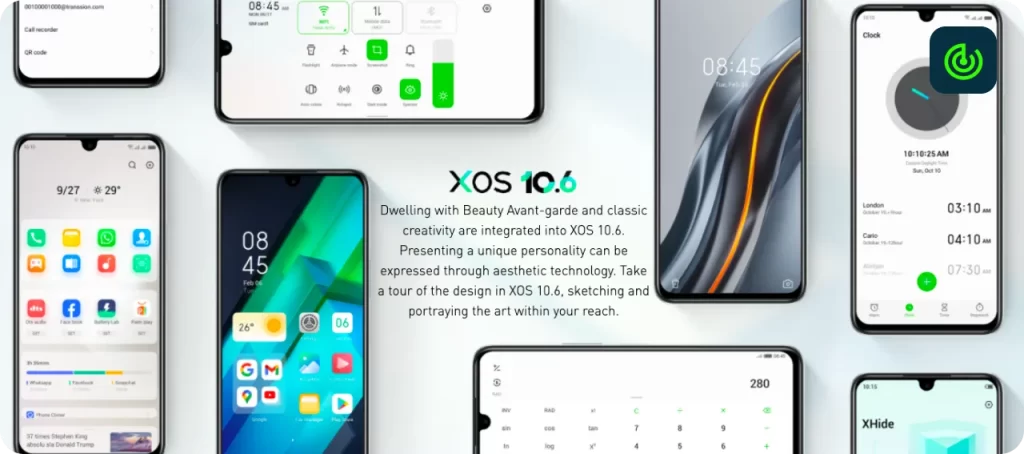
Stylized icons: The latest XOS 10.6 integrates geometric elements from nature to create a simple and clean icon experience.
Enhanced Reachability: Everything in your reach. Adapting to the way we hold our phones, the interaction area has been moved down to enable smoother reachability even with one hand.
Secure
XHide: Hide all your banking, social media apps, and personal photos with Xhide so that no one can see them without your consent.
Theft Alert: Theft Alert will sound an alarm when your phone is unplugged. Sure to come handy when a plug isn't near your seat.
Peek Proof: Keep private things private. Peek Proof will obscure your phone’s display so others have a hard time snooping at your screen when you chat or use your phone.
Kids Mode: What your child can access on your phone is now in your hands. You can set limits to phone usage and customize the apps they can use.
Smart & localized
XClone(Dual Apps): Xclone offers to clone applications for you to run multiple accounts simultaneously. Supports WhatsApp, Messenger, Facebook, Instagram and more.
Wi-Fi Smart Comm: You will always stay connected with a Wi-Fi Smart comm that auto-connects to a saved Network and turns Wi-Fi off automatically when the saved network is unavailable.
360° Flashlight: You can use both front and back Flash together for max brightness whenever you need it.
Photo Compressor: You get to save more pictures and memories by compressing photo size from MB to KB in a split of seconds.
Entertainment
Ultra Touch: A freeway for your fingers. Ultra touch provides ultimate speed and smoothness while scrolling or switching between screens.
Video Assistant: Once enabled, Video Assistant ensures you have no distractions while watching videos.
Thunder Back: Now bring any App in PiP mode with Thunder Back. This helps multitaskers switch between apps, copy OTPs, and much more!
Game Zone: A Smart way to play games and still keep the fun rolling on social media! The game floating window in Game Mode allows you to quickly reply to social media messages by floating it over your gaming screen.
Infinix Android 13 Update List
Currently, Infinix has not released a list of devices eligible for the Android 13 update. Based on the poor Android 12 update rollout from Infinix, only premium phones stand a chance of receiving the Android 13 update that what we think, but they can skip for premium phones as well.
Here’s the list of devices that we think might get the Android 13 update:
Infinix Zero X
Infinix Zero X Pro
Infinix Zero X Neo
Infinix Zero 5G
Infinix Note 12 Turbo
Infinix Note 12 VIP
[Note: This is not the final list. We’ll update the list after Infinix officially releases the list of eligible devices for the Android 13 update.]
It was recently discovered that Infinix Zero 5G will receive Android 12, in the coming August 2022 which is surprising to see, It was mentioned by Infinix India CEO, let us see how things go for this device.
Will your Infinix Smartphone Get the Next Major OS Update?
It would have been better if I had simply said, “No“ and that would have been it since if you've used Infinix smartphones for years, you should already know the story. When it comes to Android updates and general software updates, Infinix and TECNO are both slow and hesitant.
Most times, none of their smartphones get a single software update in a year, no matter how cheap or expensive they cost, and even when they do, maybe just one or two out of the many Infinix smartphones littered all over the place will do so.
Well, there are two answers to this question, the first one is “Yes“, it might, and the second one is “No“, it might not.
Conclusion
There has been no announcement of an Android 13 release date from Infinix. It has also not been announced what is in store for Android 13. Currently, Android 13 is in development, which will continue for several months. It takes smartphone companies two to three weeks for the stable Android version to be released for their devices after Google releases it.
Google just released Android 13 Beta 2 right after its impressive I/O 2022 developer conference. Here are some of the biggest new features in the second public preview of the next version of Android.
Release date: 11 May 2022, for Beta 2
In this second Android 13 Beta, Google tweaks and tunes the Pixel-specific operating system, but there are only a few minor changes. In any case, Android 13 is likely to arrive later this year alongside the recently teased Pixel 7 and Pixel 7 Pro, and we thought you should be aware of some of the notable changes.
Fixed an issue where some devices were unable to connect to the wireless carrier network after installing Android 13 Beta 1.
Fixed an issue where QR code scanning would sometimes not work when selected from the Quick Settings tile.
Fixed an issue where app icons would occasionally fail to appear after the user unlocked the device.
Fixed an issue where Bluetooth headsets would sometimes fail to accept calls or play call audio.
Fixed an issue where Pixel 6 and Pixel 6 Pro devices would crash and reboot if more than 300 apps were installed.
Fixed an issue where Pixel 6 and Pixel 6 Pro devices would reboot constantly when Bluetooth was enabled.
Fixed a regression in Android Keystore that caused some apps to crash on launch.
Fixed an issue where in some cases the system would incorrectly display an empty notification group from an app.
Fixed an issue where long-pressing Bluetooth from the settings drawer caused the UI to crash.
Fixed an issue where devices would sometimes get stuck at the Google logo during startup after receiving an OTA update.
Fixed an issue where suspending the device while a USB-C headset was plugged in would cause the device to crash and restart.
Features and changes:
Build Number
The Android 13 Tiramisu (TPBB.220414.015) pre-release version
New Developer Options toggles
Allow mock modem – This allows you to run mock modem services for instrumentation testing.
Network download rate limit – With this toggle, you can set a limit for all connections be that Wi-Fi or mobile data. You can adjust this from 128kbps to 15Mbps. We can foresee this being useful for simulating specific network conditions.
Disable Bluetooth LE Audio hardware offload – This toggle may not be usable on your device or grayed out. This option is enabled by default and should reduce delayed audio sync issues with Bluetooth devices.
Enable Gabledorsche – Sadly, the option to enable the Gabledorsche option is now removed. This option is said to improve Bluetooth network stability. It’s not clear if it will return
Vibrate mode icon return
In Android 12 QPR beta paths, we saw the vibrate status bar icon disappear. However, in the Beta 2 build, we saw a dedicated toggle replace it. A buzzing smartphone icon will appear alongside Wi-Fi, signal, Do Not Disturb, and battery icons when the toggle is turned on in Settings. Set it to on and it will appear in the "Sound & vibration" section.
Dark mode can be scheduled to enable at Bedtime
You can now set up dark mode schedules so that the darkened theme is applied automatically when you enter Bedtime mode on your phone. This does not always work and requires you to set up a Bedtime mode schedule within the Digital Wellbeing suite first.
Split-screen Improved
When you long-press an icon on your device an icon on this “dock” you’ll also get a quick toggle to enter split-screen mode without ever needing to enter the Recents app menu. This could be a great reachability enhancement when using larger tablets and foldable screens.
MORE media player tweaks
There are some further adjustments to the button layout of the notification and lock screen media player. Firstly, Quick skip will move the forward and backward controls from either side of the playback program bar to the right of the player. This makes it easier to find all of your controls but these icons have not been fully themed — or at least at this stage look out of place.
A new popup occurs when starting a long press on any media player window as part of the media resumption control. The pop-up will confirm if a player can be hidden with more prominent “Hide” and “Cancel” M3 buttons that you can press. However, the “Settings” button has now been removed in favour of a small cog icon in the upper right of this smaller player.
Animation tweaks and tuning
In the Android 13 Beta 2 update, there are a number of key animations have been updated and tuned. The most prominent is when unlocking your device. Tapping and pressing the in-display scanner on the Pixel 6 series pulsates in a more prominent manner and once unlocked there is a new expansion animation that sees your home screen icons float into view.
Battery widget changes
In Android 13 Beta 2, the useful battery level widget that you may put on your home screen to track your smartphone and accessory charge levels has been changed. If you don't have any connected devices, such as Bluetooth earbuds, the widget will now display the current battery level of your Pixel. Furthermore, rather than the somewhat confusing "Settings Services" section, the widget now lives in a specific "Battery" section when placing or searching for it.
Increased Battery Saver minimum level
The default setting for the Battery Saver mode has been increased from 5% to 10%. This is likely to help extend durability much farther than the lower amount would allow. You can always manually enable the lowest option to get around this, but we're hoping it will return in a future build.
Android 13 Beta 2 Released Devices
Android 13 is now ready for testing on more OEM devices, following several months of development. Apart from Google Pixel, 11 additional brands will release Android 13 releases for their devices:
Android 13 Beta for the OnePlus 10 Pro is now available as part of the Developer Preview Program, according to OnePlus' community post. As part of our efforts to provide all OnePlus 10 Pro users with early access to the latest Android version, we have worked tirelessly during this time.
Release Date: May 11th 2022, Limited users directed toward Testers/Developers
OnePlus 10 Pro was released on 13th January 2022 with Android 12 out-of-the-box.
Developers and other advanced users should use this build of Android 13. In order to create even better software experiences, it is important to provide early adopters with access to Android 13 at an early stage. It is expected that the software will contain bugs since it is still under testing.
How to install the Android 13 Developer Preview Update in your Oneplus 10 Pro:
Download the latest ROM upgrade zip package from the specified server.
Copy the ROM upgrade package to the phone storage.
Go to Settings -> About device -> Version -> Click Build number 7 times and enter the password, now you are in the developer mode.
Go back Settings -> About device -> Up to date -> Click the top right button -> Local install -> Click on the corresponding installation package -> Extract -> Upgrade -> System upgrade completed to 100%.
Download the latest ROM rollback zip package from the specified server.
Copy the ROM rollback package to the phone storage.
Go to Settings -> About device -> Version -> Click Build number 7 times and enter the password, now you are in the developer mode.
Go back Settings -> About device -> Up to date -> Click the top right button -> Local install -> Click on the corresponding rollback package -> Extract -> Upgrade -> System upgrade completed to 100%.
Developers will be able to test their apps with an upcoming Android version early with this early Android 13 build. Its main purpose is not to collect bugs. You can use the built-in feedback tool of Google to provide feedback on any bugs you encounter with this build.
Google has finally released the first beta build program for beta testing of Android 13. You should receive Android 13 Beta 1 as an OTA software update. The Android 13 Beta 1 has finally released after two developer reviews in February and March. Google has been working on making a bug-free version for the future building core themes, strengthening privacy and security, and supporting other devices and screens as well.
Obviously, there are going to be issues with the beta testing since it is the first beta program and three more are to be released before they release the final version later in 2022. But, hopefully, there wouldn't be some flamboyant issues. Earlier it had received two developer previews which had minor changes in the system.
Release date: April 2022, for Beta 1
Beta 1 introduces updated audio routing APIs and implemented new permissions for more granular access to media files. On May 11 and 12, more information regarding the beta testing and features will be shared at the Google I/O conference. For the next software builds, you will be getting it just like any other normal updates. You'll get the first beta (and subsequent ones) OTA if you're already running the installed Android 13 Developer Preview build.
The newest upgrades to previously announced features, including the new notification permission, customized app icons, better localization and language support, and more, are included in Beta 1. For Android 13, they have also been working on the privacy and security areas to improve the experience of the users while providing them with new APIs.
They are also introducing more granular permissions for access to some media files. Earlier, one permission was asked for all the three formats, which paved the way for access to all the media files. But now, they have broken it down into three different permissions- images, audio, and video.
Enhanced reporting of errors in Keymint and Keystore
Talking about new peculiarities, you can now change the procedures for key generation, signing, and encryption. You should now be able to retry key generation thanks to the enhanced error reporting. Using KeyStore and KeyMint, you now have more detailed and accurate error indicators.
The Android 13 Tiramisu (TPB1.220310.029) pre-release version update size is [429 MB - 1GB].
Lock Screen
Starting from the basics, you can see the sentence "Enter your PIN" when you switch on your Pixel smartphone. While entering your pin, the impressions on the keypad have been improved and customized which is another cool feature of the Android 13 Beta 1.
Another cool feature that has been introduced/added in the pre-release is the "Control from locked device". If you go to the settings, then in Display, and then Lockscreen, you'll find an option named "Control from locked device". This feature will let you control external devices in your home without unlocking your phone. Just simply switch on the phone and on the bottom left, you can access all the options such as switching on/off office lamps or lights.
Wallpapers
In the new version, you have an abundance of wallpapers and basic colours to choose from Material YOU dual colours. There are more than 10 different palettes and four sections of basic colours so you can easily customize the display of your phone whilst having many colours and styles to choose from.
Refined Media and Tiles Settings
You can see some of the icon changes when you scroll down for tiles and settings. Secondly, Priority Mode has been changed to Do Not Disturb mode. Some little changes in the Cast device option can also be seen such as light theme and icon replacement.
Change in Settings
Talking about overall changes in settings, some of the previously added features in the Developer Preview have been either removed or their place has been shifted to another tab or settings. The names of some of the features have also been changed. For example, Follow Typing is now called as Magnify Typing. App Languages feature has been removed in Beta 1. A graphical presentation can also be seen or viewed under Button Navigation.
Screen Resolution
Google is also working on providing users with the option to adjust the screen resolution. Basically, the user will be provided with two resolutions of adjustments- 1080p FHD+ and 1440p QHD+.
Devices Eligible for Android 13:
Google Pixel 4
Google Pixel4 XL,
Google Pixel4a,
Google Pixel4a 5G,
Google Pixel 5,
Google Pixel 5a,
Google Pixel 6 and,
Google Pixel 6 Pro
App Testing
For developers, there are many more details to look into and explore including the privacy features, Bluetooth LE audio, and the new list of APIs that improve audio routing and build a great experience for the user. You can also check the compatibility of the applications in Android 13 to rule out any bugs for the version in the future. If any bugs are found, the updates for the application shall be timely released.
We can expect three more beta releases by the company in the future. In June and July, they will be proceeding towards Platform Stability and furthermore, we can expect the final release of Android 13 later in 2022. Until then, applications should get the compatibility testing, and bring the updates as per the compatible version of the app because, in the upcoming weeks, more users will be testing the Beta 1 release and find issues with the concerned application.
Should You Install It?
While Google has released Android 13 Beta 1 for the users, there have been issues of screen freezing and instability while using the new version. It's just Beta 1 of the version and Google will be taking this to Beta 4, so it is advised that you should wait for other beta versions to be released so that your phone may handle the newest version without any loss or lags.